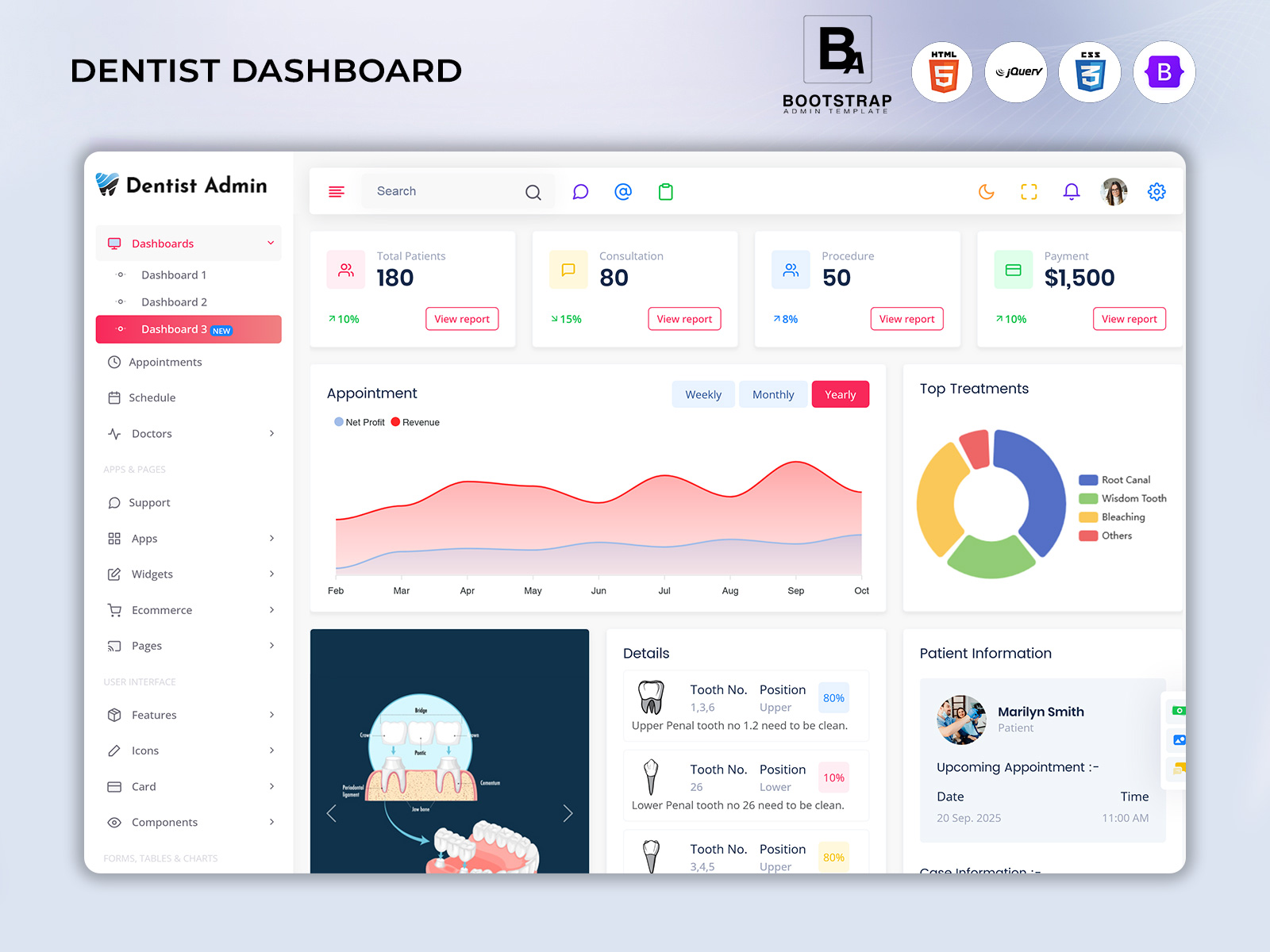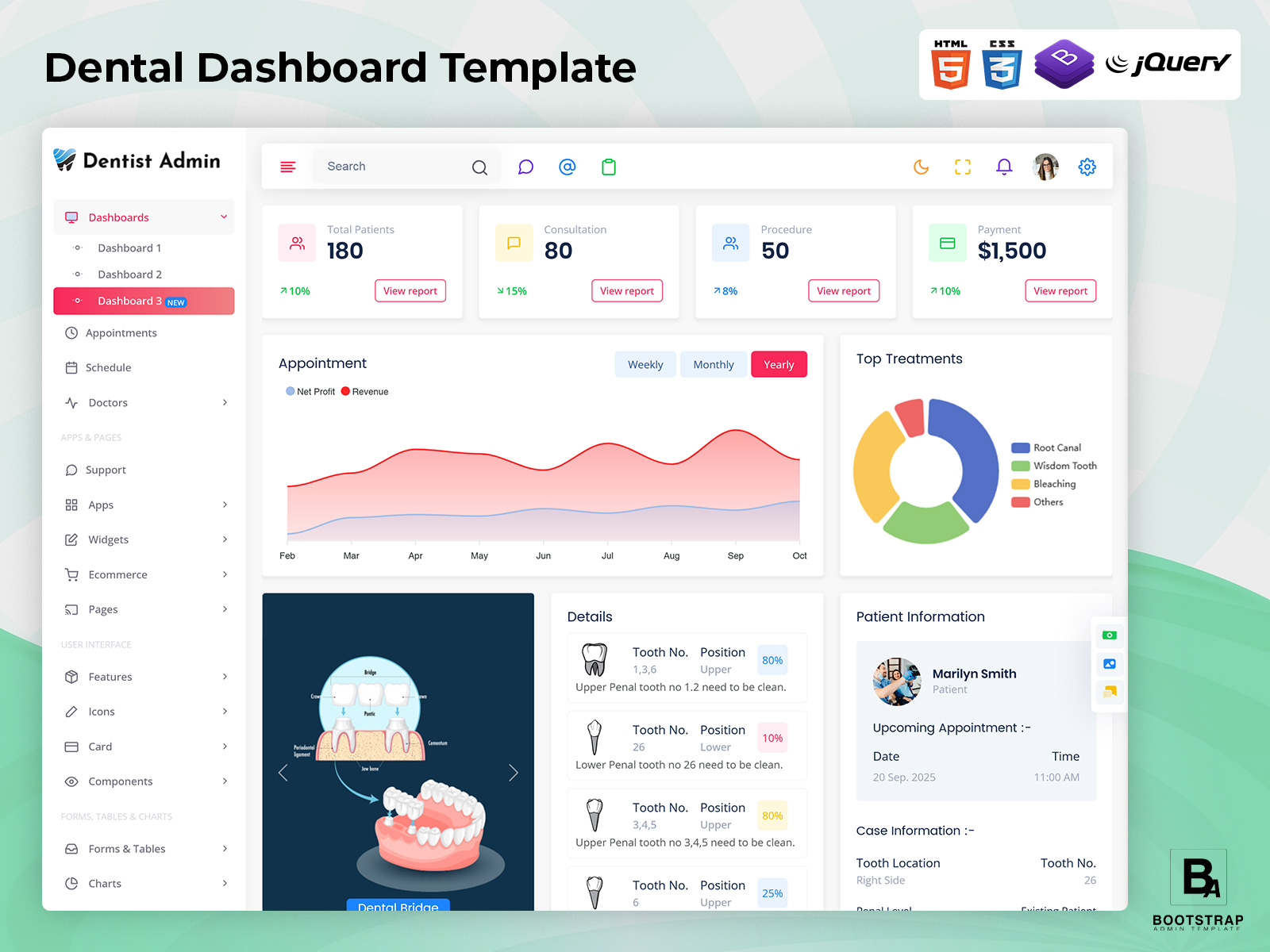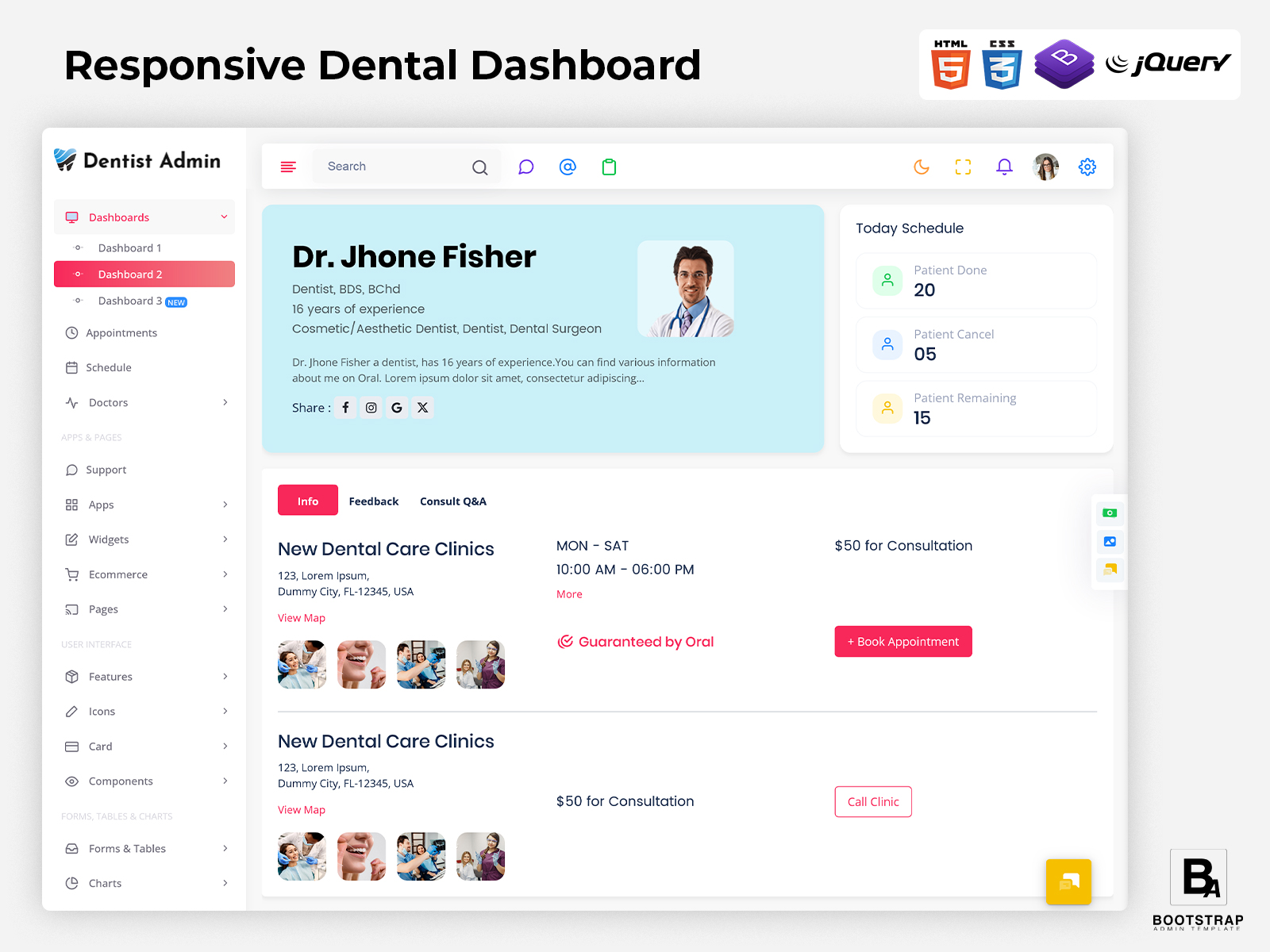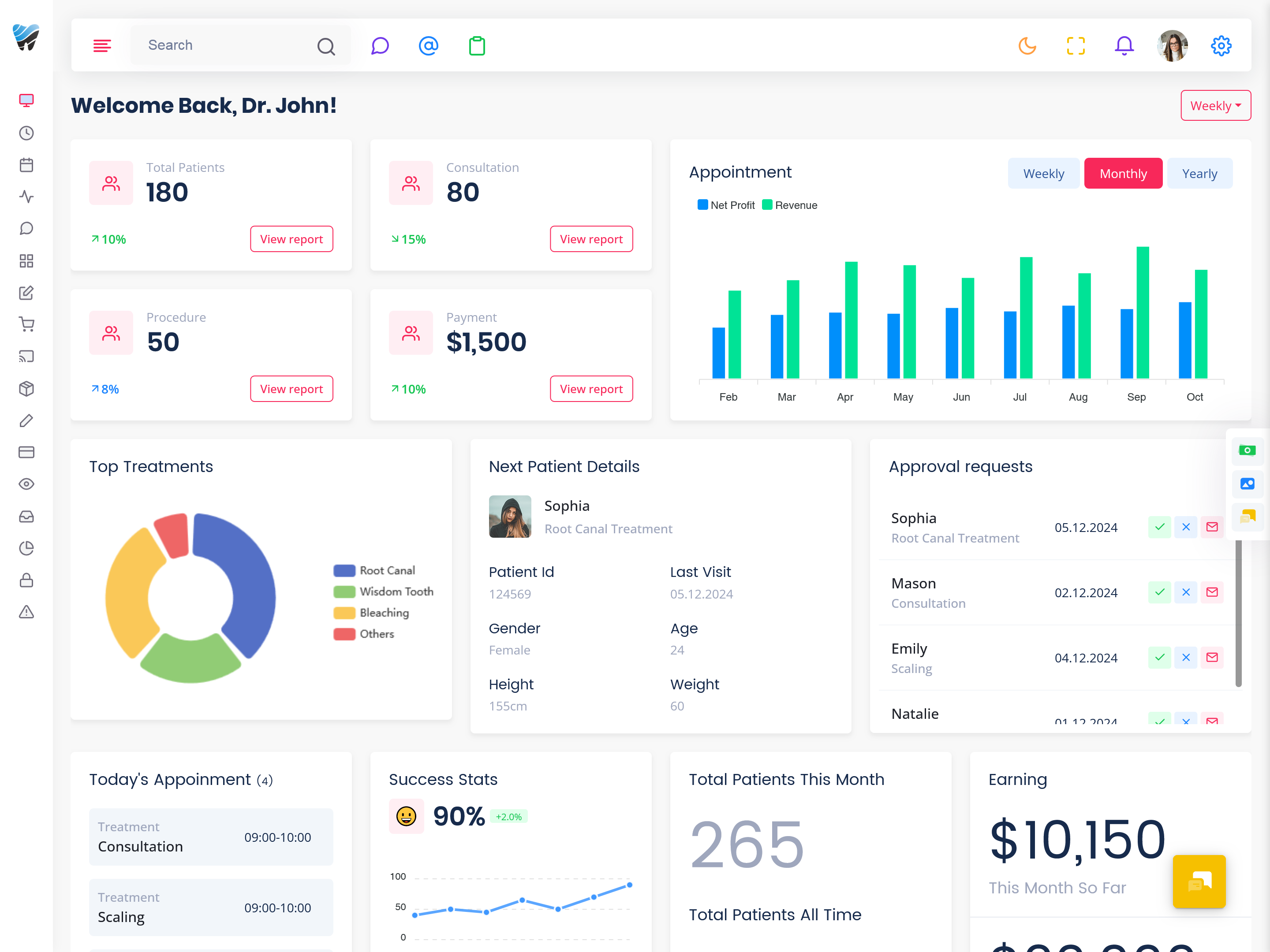
Dental Dashboard Template for Practice Management
What Is a Dental Dashboard?
A Dental Dashboard is a centralized digital platform created for dentists. Rather than having dentists rely on multiple systems to schedule appointments, collect patient data, follow up on treatments, manage billing, and track team performance, dentists can manage everything from a single dashboard.
We see activities at the dental clinic all happening at the same time. Patients arrive for consultations, patients return for follow‑up appointments, patients wait for treatment, patients complete payments or patients request information about their visit. Dentists and staff must manage schedules, treatment records, available rooms, staff responsibilities and daily administrative work. A dashboard can give the clinic team a clearer picture of these activities, without requiring them to move between unrelated screens.
The primary role of a Dental Dashboard is not about replacing the professional and clinical system in the clinic. Rather, it may serve as a structured interface whereby the relevant personnel may gain access to all information and processes that are necessary. For instance, the receptionist may be keen on the current schedule of patients for appointment, while the practice manager may require more than just that.
An effective dashboard can help the staff understand the patient’s path in the practice. A patient who is visiting for the first time might go through steps of registration and consultation, whereas an already-existing patient may have received the treatment plan and scheduled follow-up.
This is where a Dental Admin Template can be useful during development. Instead of creating every administrative interface from the beginning, developers can start with an existing dashboard structure and customize it according to the dental application’s requirements. Patient lists, appointment views, forms, tables, navigation areas, and other interface sections can be adapted to suit the intended workflow.
For developers working with Bootstrap, a Dental Bootstrap 5 Admin Template can provide a modern frontend foundation for a dental practice management application. Bootstrap-based components can be organized into pages that match the clinic’s processes while allowing developers to connect the interface to their own backend systems.
I have seen that a Dental Dashboard works best when it shows how a real dental practice runs. The aim of a Dental Dashboard is to make information easier to find tasks easier to organize and everyday clinic work connected.

BUY NOW DEMO
How a Dental Dashboard Supports the Patient Journey
However, the contact between a patient and a dental practice may start even before one gets to sit in the dental chair. One can get an appointment, be confirmed about it, come to the dental office, register, meet the dentist, get the treatment discussed, pay, and go for a follow-up.
A dashboard can help staff see these different stages as part of one connected process. Instead of treating every activity as a separate administrative task, the interface can provide a clearer view of where the patient currently stands.
For example, if a patient finishes their initial consultation but is in need of one more appointment, the dashboard can assist staff in recognizing what the next steps are. Likewise, in cases where a treatment requires multiple visits, the patient’s next steps will be easier to handle when their previous visits are connected with their future visits.
This approach can also help reception teams handle busy periods. When several patients are scheduled close together, staff can review the day’s activity and prepare for expected arrivals. A clear schedule can make it easier to understand where appointment gaps exist and where the clinic may experience a heavier workload.
A dashboard can also support communication between administrative staff and dentists. When relevant information is organized properly, the receptionist does not have to depend entirely on informal notes or separate messages to understand what administrative action is required.
The result is a workflow that connects scheduling, patient communication, treatment progression, and follow-up activities while keeping the interface understandable for different members of the dental team.
Features of a Dental Dashboard
Appointment Flow Management
A dental dashboard is capable of organizing daily appointments based on parameters such as time, patient, dentist, kind of appointment, and status. This provides receptionists a very handy way to get a clear view of the day’s schedule while making it easy to find upcoming patients without having to go through separate files.
Understanding the Patient Journey
A dashboard can give its users a clear view of where patients are located in their clinic processes. This allows for a proper arrangement of new sign-ups and consultations, treatment procedures, visits completed, as well as follow-up appointments taking into account the workflow of the application.
Treatment Follow-Up Organization
Dental treatment can take more than one visit instead of just one appointment. A dashboard can help the team keep track of follow-up plans and things that need to happen with patients. This makes it easier to spot cases that need another meeting to be scheduled.
Dentist Schedule View
Dentists may have different working hours, treatment responsibilities, and appointment patterns. A dedicated schedule view can help administrative staff understand availability and coordinate bookings according to the clinic’s internal scheduling rules.
Patient Search and Record Access
A searchable patient area allows authorized staff to locate relevant records without manually browsing through long lists. Information can be organized around patient identity, appointments, treatment-related details, or other fields required by the application.
Payment and Administrative Tracking
Dental practices also manage invoices, payments, outstanding amounts, and other administrative activities. A dashboard can provide appropriate sections for these tasks so financial information is not separated completely from the patient’s overall administrative journey.
Practice Activity Overview
The dashboard will provide a summary of selected activities from the practice in a form that will make it easier for management to evaluate how well the clinic is performing. The type of activities depends on the system being used.

BUY NOW DEMO
Using a Dental Bootstrap 5 Dashboard Template for Practice Workflows
A Dental Bootstrap 5 Dashboard Template can be useful when developers need to build a dental application without designing every interface element from the ground up. The template can act as a visual starting point while the actual application logic remains connected to the project’s backend.
One important consideration is that a dental application needs more than a generic healthcare layout. Dental practices have their own scheduling patterns, treatment processes, patient communication requirements, and administrative routines. A template should therefore be treated as a customizable foundation rather than a finished practice-management system.
For example, developers can organize the main dashboard around the questions clinic staff ask throughout the day. How many appointments are scheduled? Which dentists are available? Which patients are expected next? Which follow-ups need attention? Which administrative tasks are still pending?
These questions can influence how the interface is structured.
A Dental Admin Template can also help separate information according to staff responsibilities. Receptionists may need appointment and patient registration screens, dentists may need treatment-related information, and practice managers may require broader operational views. A role-oriented structure can keep each interface focused on the tasks relevant to its users.
Another useful area is appointment coordination. A clinic may have multiple dentists and treatment rooms, and appointment scheduling can become complicated when several services are offered. A dashboard can provide a central scheduling interface where authorized users can review availability and organize bookings.
The same interface can also support follow-up planning. Some dental treatments require patients to return after a particular period, while others may involve several appointments. Keeping these future interactions visible can help administrative teams avoid overlooking planned patient visits.
Communication is another area where a dashboard can improve workflow. Staff can use organized patient information to prepare for upcoming appointments and respond to routine administrative questions more efficiently.
For developers, the advantage of starting with a Bootstrap-based template is the ability to customize the interface around these workflows rather than spending the initial development stage creating every basic admin screen from scratch.
Benefits of Dental Dashboard
Organized Clinic Scheduling
Daily appointment details can be easier to access through a central dashboard. Reception teams can work with a systematized schedule that displays information such as future visits, the availability of dentists, and other booking data necessary for daily management.
Better Patient Flow
When patient activities are arranged based on their stage staff can clearly see what needs to be done next. This makes it easier to manage the flow of work from registration and consultation all the way through follow-up visits. It helps keep things organized and reduces confusion. Everyone knows what to focus on at each step, which leads to an efficient process overall.
Easier Follow-Up Management
It may be necessary to visit the patients several times during a course of treatment. The dashboard will help keep the upcoming appointments and subsequent actions on track rather than having reminders or lists separately.
Improved Staff Coordination
Different members of a dental practice have different responsibilities. A shared dashboard structure can give authorized employees access to the information they need while supporting better coordination between reception, dentists, and administrative staff.
Faster Information Access
Searchable records and organized navigation can reduce the time spent looking for patient or appointment information. Staff can move directly toward the relevant section instead of manually checking several disconnected sources.
More Structured Administration
Billing, appointments, patient registration, scheduling, and follow-up work can be managed through related sections of the same application. This creates a more connected administrative environment for daily dental practice operations.
Flexible Application Development
A customizable dashboard gives developers room to adapt the interface to a clinic’s specific workflow. Different practices can organize pages, fields, roles, and modules according to their services and operational requirements.
How a Dental Dashboard Can Support Growing Dental Practices
As a dental practice grows, the number of appointments, patients, dentists, services, and administrative activities can increase significantly. A workflow that was manageable for a small clinic may become harder to maintain when more people and processes are involved.
A dashboard can provide a common interface for organizing this growth. Instead of adding unrelated tools whenever a new requirement appears, the practice can build different functions into a connected application structure.
For example, a clinic that begins with one dentist may later have several dentists with different schedules. The dashboard can be adapted to show their availability and appointment activity in a way that is easy for reception staff to understand.
The same applies to treatment services. As a practice adds services, the system may need additional appointment categories, patient information fields, or administrative workflows. A customizable Dental Bootstrap 5 Dashboard Template can provide a frontend structure that developers can extend as these requirements change.
Growth can also make follow-up management more important. With more patients undergoing different treatment stages, manually remembering future appointments becomes increasingly difficult. A centralized interface can make scheduled follow-up activity easier to review.
For practice managers, the dashboard can become a useful operational workspace. Rather than looking at isolated pieces of information, they can review selected areas of the clinic’s activity from a consistent interface.
This does not mean every possible feature needs to be placed on one screen. In fact, an effective dashboard should avoid unnecessary information. The better approach is to organize information according to the tasks users actually perform.
Bootstrap Admin Template for Dental Dashboard Development
Bootstrap Admin Template provides ready-made admin interfaces that developers can adapt for healthcare and other application requirements. Its healthcare-focused templates include patient management, clinical tools, encounter tracking, billing, operational information, and department-oriented interfaces, while its Bootstrap 5 medical dashboard provides multiple dashboard layouts and interface structures. For developers creating a Dental Dashboard Template, these resources can provide a starting frontend structure that can be customized into a Dental Admin Template according to the clinic’s own patient workflow, appointment system, staff roles, treatment process, and backend requirements. The existing templates are general healthcare/admin products, so dental-specific functionality would need to be implemented according to the application’s requirements.
Conclusion
A Dental Dashboard can bring important areas of dental practice administration into a more organized digital workspace. From appointment scheduling and patient records to follow-up planning and administrative activities, the interface can help staff work with information in a more connected way.
The value of a dashboard comes from how well it matches the actual workflow of a dental clinic. A receptionist may need a quick view of appointments and patient arrivals, while a dentist may require access to treatment-related information. Managers may need a broader understanding of schedules and practice operations.
A Dental Bootstrap 5 Admin Template can provide developers with a foundation for creating these different interfaces. By customizing the layout, fields, modules, navigation, and data connections, developers can create an application that fits the needs of a particular dental practice rather than forcing the clinic into a generic workflow.
The goal is not simply to create another administrative screen. A useful dental dashboard should make everyday information easier to find and help staff move smoothly from one task to the next. When the interface reflects real clinic operations, it can become a practical part of modern dental practice management.
BUY NOW DEMO
Frequently Asked Questions
1.What is a Dental Dashboard Template used for?
A Bootstrap Admin Template Dental Dashboard Template provides a predesigned interface structure that developers can adapt for dental practice management applications. It can be customized with appointment pages, patient records, schedules, treatment workflows, billing sections, staff management, and other functions required by a particular dental clinic.
2.Why should developers use a Dental Admin Template?
A Bootstrap Admin Template Dental Admin Template can reduce the amount of frontend interface work required when developing a dental management application. Instead of creating every dashboard layout, table, form, navigation area, and administrative screen from the beginning, developers can customize an existing structure and connect it with their own application functionality.
3.What can be included in a dental dashboard?
The exact contents depend on the application, but a Bootstrap Admin Template dental dashboard can include appointment schedules, patient information, dentist availability, treatment follow-ups, administrative tasks, billing information, staff-related sections, and operational summaries. Developers can select modules according to the actual workflow of the practice.
4.Is a Dental Bootstrap 5 Dashboard Template suitable for multiple dentists?
It can be adapted for practices with multiple dentists. Developers can create schedule views, staff profiles, appointment assignments, and role-based sections according to the application’s requirements. The interface can then connect with the backend system used to store availability, bookings, and related information.
5.Can a Dental Dashboard Template be customized for a small clinic?
Yes. A small clinic does not necessarily need every available dashboard module. Developers can keep the interface focused on the functions the clinic actually uses, such as appointments, patient registration, dentist schedules, payments, and follow-up management. Additional sections can be added as the practice grows.
6.Is a Dental Bootstrap 5 Admin Template a complete dental management system?
No. A frontend admin template primarily provides the user-interface foundation. Dental-specific business logic, patient data handling, authentication, database connections, appointment rules, permissions, integrations, and other application functionality need to be implemented according to the project’s requirements.
7.How can Bootstrap Admin Template help with dental dashboard development?
Bootstrap Admin Template offers healthcare and Bootstrap-based admin interfaces that developers can customize for different web applications. Its medical templates include patient and administrative interface structures, which can serve as a starting point for developing a dental-focused dashboard with the application’s own data, workflows, and functionality.