

Ecommerce Dashboard: Smarter Online Store Management
The ecommerce dashboard allows critical data about the store to be put in one consolidated place. This allows the administrator to avoid going through different reports on various activities and instead view critical numbers and changes on one workspace. This simplifies the back end for everyone while providing a practical means of interacting with the store data
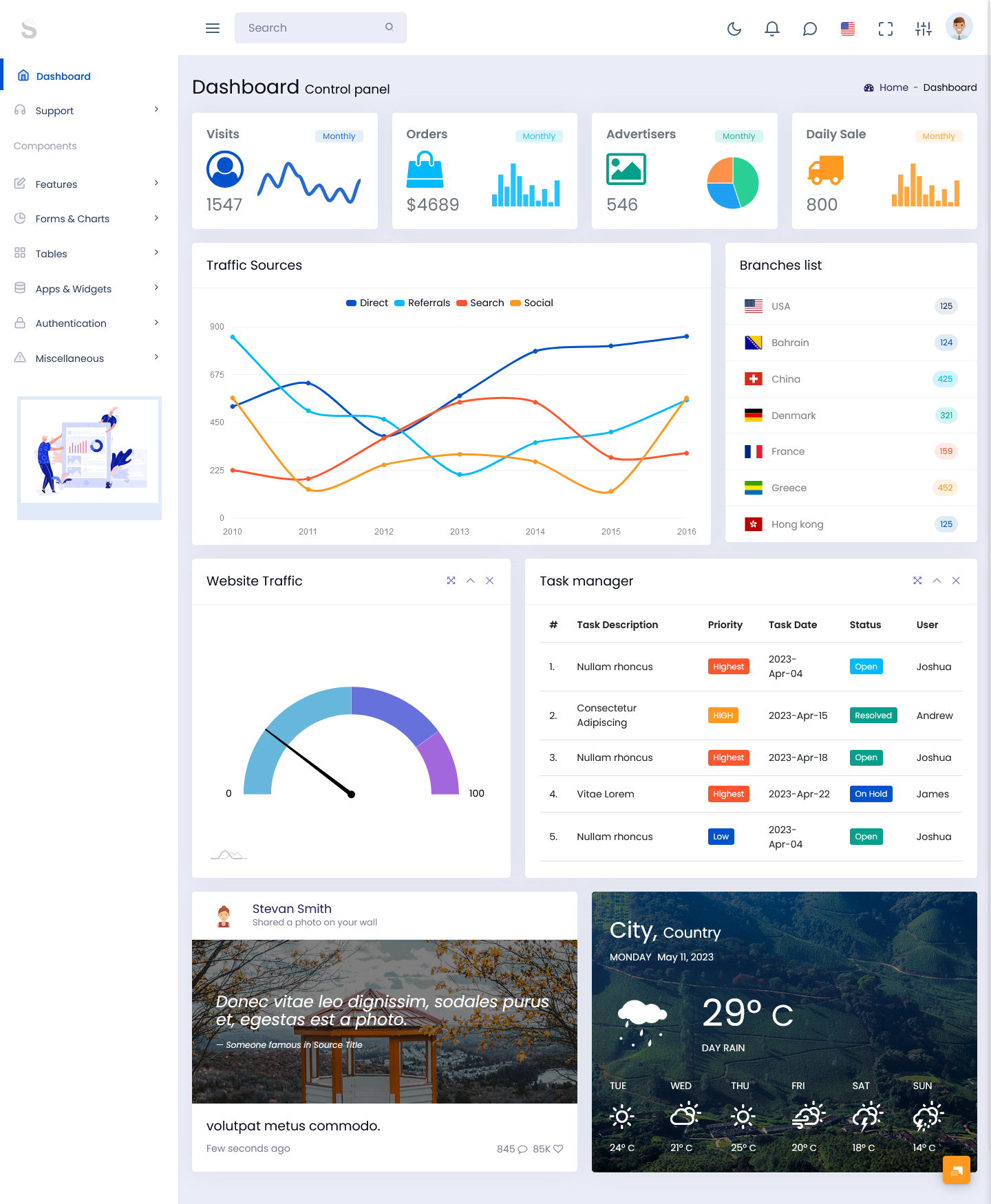
For businesses building or upgrading an online shopping platform, an ecommerce admin dashboard can provide the foundation for the management side of the application. It can be adapted for different store models, product categories, order volumes, and internal workflows. A well-planned interface can also make routine administrative work more structured without making the backend unnecessarily complicated.
What Is an Ecommerce Dashboard?
An ecommerce dashboard is an administrative interface designed to organize and display important information from an online store. It gives administrators a central place to review business activity such as orders, product movement, customer activity, revenue trends, inventory conditions, and other operational information.
The purpose is not simply to display numbers. A useful dashboard helps turn large amounts of store data into information that can be understood quickly. For example, an administrator may want to see whether orders are increasing, which products are receiving attention, whether certain items require stock updates, or how returns are affecting daily operations. Presenting these details in a structured interface makes it easier to locate the information that matters at a particular moment.
An ecommerce dashboard can also support different members of an online business. A store manager may focus on sales and orders, while an inventory team may need product and stock information. Customer support staff may be more interested in order status and customer records. Bringing these activities into an organized administrative environment can reduce unnecessary movement between different sections of a system.
The interface can be designed around the actual workflow of the store rather than forcing every business to follow the same structure. A small online retailer may require a simple overview with essential store metrics, while a larger marketplace may need several management areas and detailed reporting.
For developers, an ecommerce admin template provides a ready-made interface foundation that can be connected with the application’s backend and database. Instead of designing every administrative screen from the beginning, developers can start with established layouts and modify them according to project requirements.
How an Ecommerce Dashboard Supports Daily Store Management
Online stores generate new information throughout the day. Orders arrive, products change in availability, customers create accounts, payments are processed, and returns may be requested. An ecommerce dashboard can provide a single working environment where these activities are easier to review.
1. Sales Activity at a Glance
Sales information can be presented through summaries and visual reports that help administrators understand current store activity. Comparing different periods can reveal changes in purchasing patterns without requiring teams to manually organize every number.
2. Order Workflow Visibility
There are several phases in order processing, such as placing the order, paying for it, packaging, delivery, or cancellation of the order. The dashboard helps arrange those phases so that administrators know about any delayed or pending orders.
3. Product Monitoring
Product information is an important part of store administration. An organized interface can help teams review product listings, pricing, availability, categories, and other details from a dedicated management area.
4. Inventory Awareness
Stock information can be connected with product management so teams can notice items that are becoming unavailable. This is particularly useful for stores handling a large catalog where manually checking every product would take considerable time.
5. Customer Activity
Customer-related information can help administrators understand account activity and purchase behavior. Instead of treating customers only as order numbers, the dashboard can provide a structured view of their interaction with the store.
6. Returns and Adjustments
Returns, cancellations, refunds, and other order adjustments can affect store operations. Including these activities within the administrative interface helps teams maintain a clearer view of what has changed after an order was placed.
7. Reports for Better Planning
Reports can bring historical and current information together for comparison. Store teams can use these views to identify changes, review performance periods, and plan future operational activities using available business data.
A Scalable Foundation for Modern Ecommerce Operations
A growing store often develops new requirements as its product range and customer base expand. A dashboard that works for a small catalog may need additional management areas when the business starts handling hundreds or thousands of products. This is why flexibility matters when selecting the interface foundation for an online commerce application.
A useful ecommerce admin dashboard should make frequently used information easy to reach. Administrators should not have to move through several unrelated pages simply to understand the current condition of their store. Navigation, summaries, tables, filters, and reporting sections can be arranged around the tasks users perform most often.
Another important consideration is information density. An administrative interface needs to display useful information without making every screen feel crowded. Clear grouping can help separate sales information from inventory records, customer information, and operational tasks. This creates a workspace where users can concentrate on the area they are currently managing.
For developers, an ecommerce bootstrap dashboard can offer a structured starting point for building this type of interface. Bootstrap-based layouts can be adapted to different screen sizes and project requirements, while developers can connect the interface with their preferred backend technology and business logic.
The dashboard can also evolve as the application changes. New reporting sections, product fields, order statuses, customer tools, or management screens can be introduced without redesigning the complete administrative experience. This makes a reusable interface foundation useful for projects that are expected to grow over time.
Benefits of Ecommerce Dashboard
1. Centralized Store Information
An ecommerce dashboard brings important store information into one administrative environment. Sales, orders, products, customers, and operational details can be organized into separate sections, helping teams find relevant information without constantly switching between unrelated systems.
2. Faster Daily Monitoring
Administrators can review important store activity from a single interface instead of manually collecting information from multiple pages. This can make routine monitoring more convenient, especially when a business handles frequent orders and regular product updates.
3. Clearer Operational Workflow
Order management, product updates, inventory checks, and customer activities can follow a more structured process when they are presented through an organized backend. Teams can identify the task they need and move directly to the relevant management section.
4. Easier Performance Comparison
Dashboard reports can help teams compare information across selected periods. Looking at changes in orders, sales, products, or other business metrics can provide useful context when reviewing store performance and planning upcoming activities.
5. Flexible Store Management
Online enterprises vary in their administrative needs. Using a customizable dashboard enables developers to change parts, forms, navigation, and report sections based on the workflow of the particular application rather than having a set interface.
6. Better Use of Business Data
Large amounts of store data become more useful when presented in a readable format. Tables, summaries, filters, and visual representations can help administrators locate patterns and information that may be difficult to notice in unorganized records.
7. A Strong Foundation for Expansion
Management of an online store can become complicated as its size increases. Starting the development process by using an ecommerce administration template will provide the framework which developers can then expand with more modules.
Building Ecommerce Interfaces with Bootstrap Admin Template
BootstrapAdminTemplate provides ready-made admin interface foundations for developers and businesses working on web applications. Its collection includes Bootstrap-based dashboard solutions that can be adapted for different project requirements rather than requiring every administrative screen to be created from the ground up. The available templates cover different interface styles, layouts, components, and application needs, giving developers a practical starting point for customizing their own management systems. Existing template offerings also demonstrate support for areas such as dashboards, tables, forms, charts, applications, and other administrative interface components.
Conclusion
An ecommerce dashboard is an important part of the management side of an online store. It gives administrators a structured environment for reviewing sales activity, orders, products, customers, inventory, returns, and other operational information.
The real value of a dashboard comes from how well it fits the way a business works. A clear interface can make frequently used information easier to access, while flexible layouts allow developers to adapt the system as store requirements change.
For projects that need a ready-made administrative foundation, an ecommerce admin template can reduce the amount of interface work required at the beginning of development. A Bootstrap-based approach can further provide a flexible starting point for creating responsive management screens and adapting them to different online retail applications.
Whether the project is a small online shop, a growing retail platform, or a larger commerce application, choosing an interface that can organize information clearly can make everyday administration more manageable.
Frequently Asked Questions
1. What should an ecommerce dashboard include?
The components of a Bootstrap Admin Template ecommerce dashboard include sales data, orders, products management, inventory details, customers, returns, financial data, and reporting features. These components should vary depending on the workflow of the store and the kind of data that the managers require to view.
2. Can an ecommerce admin dashboard be customized for my store?
Yes. A Bootstrap Admin Template dashboard interface can be customized according to the store’s business requirements. Developers can modify navigation, add application-specific fields, change layouts, connect backend functionality, and introduce additional modules based on how the online store operates.
3. What is the difference between an ecommerce dashboard and an ecommerce admin template?
An ecommerce dashboard is the working administrative interface used to manage and monitor an online store. An ecommerce admin template is a pre-designed interface foundation that developers can use to create or customize that administrative system for a particular ecommerce application.
4. Is an ecommerce bootstrap dashboard suitable for mobile devices?
A Bootstrap-based dashboard can be designed with responsive layouts so administrative screens adapt to different screen sizes. However, the final mobile experience also depends on how the template is customized and how the application’s tables, forms, navigation, and other components are implemented.
5. Can I connect an ecommerce admin template with my existing backend?
Yes. An Bootstrap Admin Template admin template generally provides the frontend interface, while the backend handles application logic, databases, authentication, and other functionality. Developers can connect the interface to an existing backend according to the technology and architecture used by the ecommerce project.
6. Can a dashboard handle a large product catalog?
A Bootstrap Admin Template dashboard can be structured to support large product catalogs by using organized tables, search, filtering, pagination, categories, and other management features. The actual performance and scalability will depend on the application’s backend, database design, and implementation.
7. How can an ecommerce dashboard help store administrators?
Bootstrap Admin Template gives administrators a central workspace for reviewing store activity and managing important operations. Instead of dealing with scattered information, users can work through organized sections for orders, products, customers, inventory, reports, and other areas relevant to their ecommerce business.
