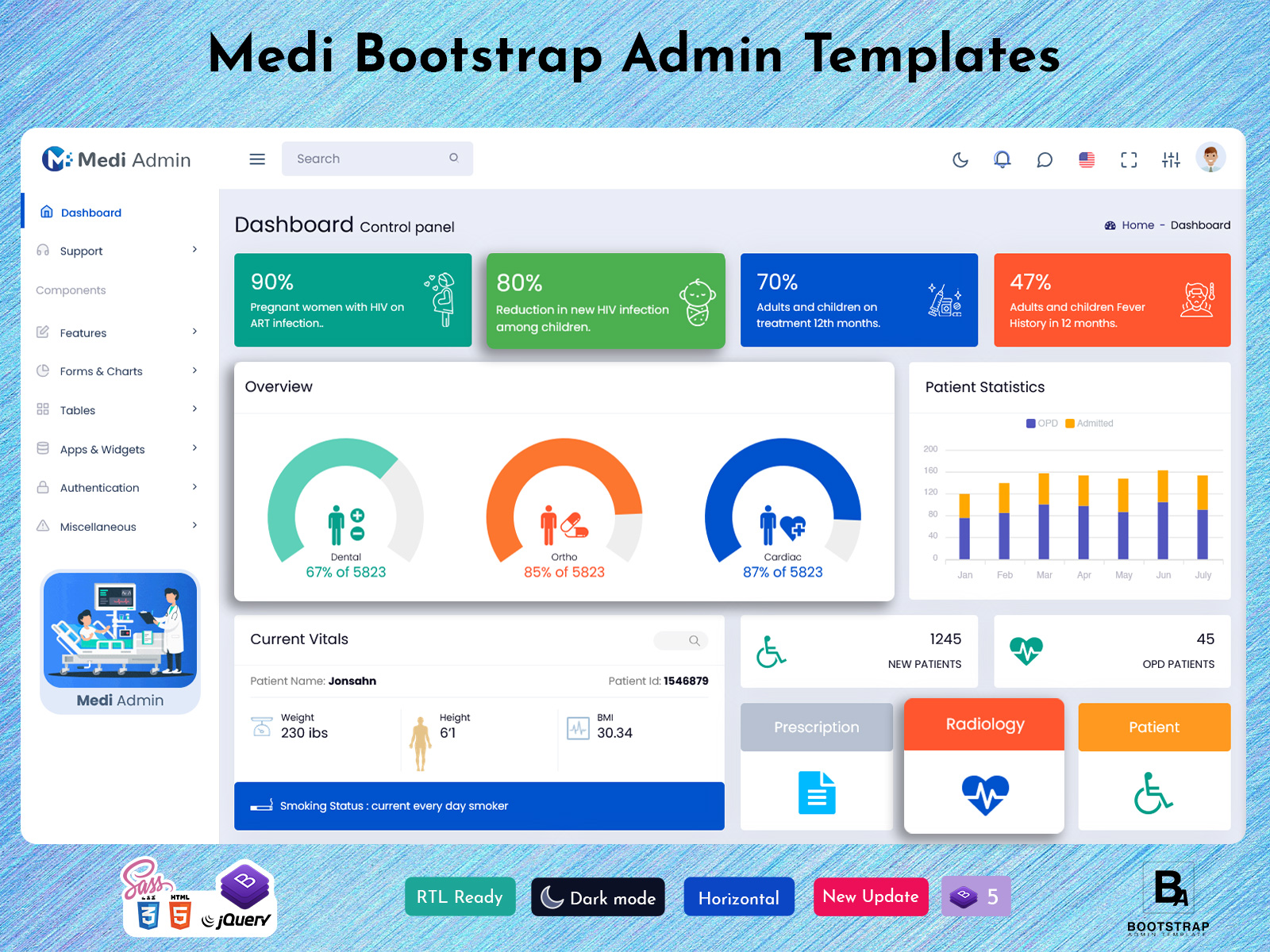
Next-Gen Admin Dashboard Template with 4+ Unique Layout Dashboards for Medical
A Dashboard Admin Template is essential for healthcare settings that depend on clarity, organization, and quick access to patient information. The Medi system has been built to create a structured and reliable digital environment for hospitals and clinics. With responsive layouts, modern design, and healthcare focused features, this template provides medical teams with a powerful solution for managing daily operations efficiently. Built with strong development standards, it serves administrators, doctors, nurses, and support staff who need a practical tool to track patients, analyze trends, and optimize workflow without confusion.
Explore Dashboard
Vertical Layout & Light Version
BUY NOW DEMO
1. Control Panel Overview
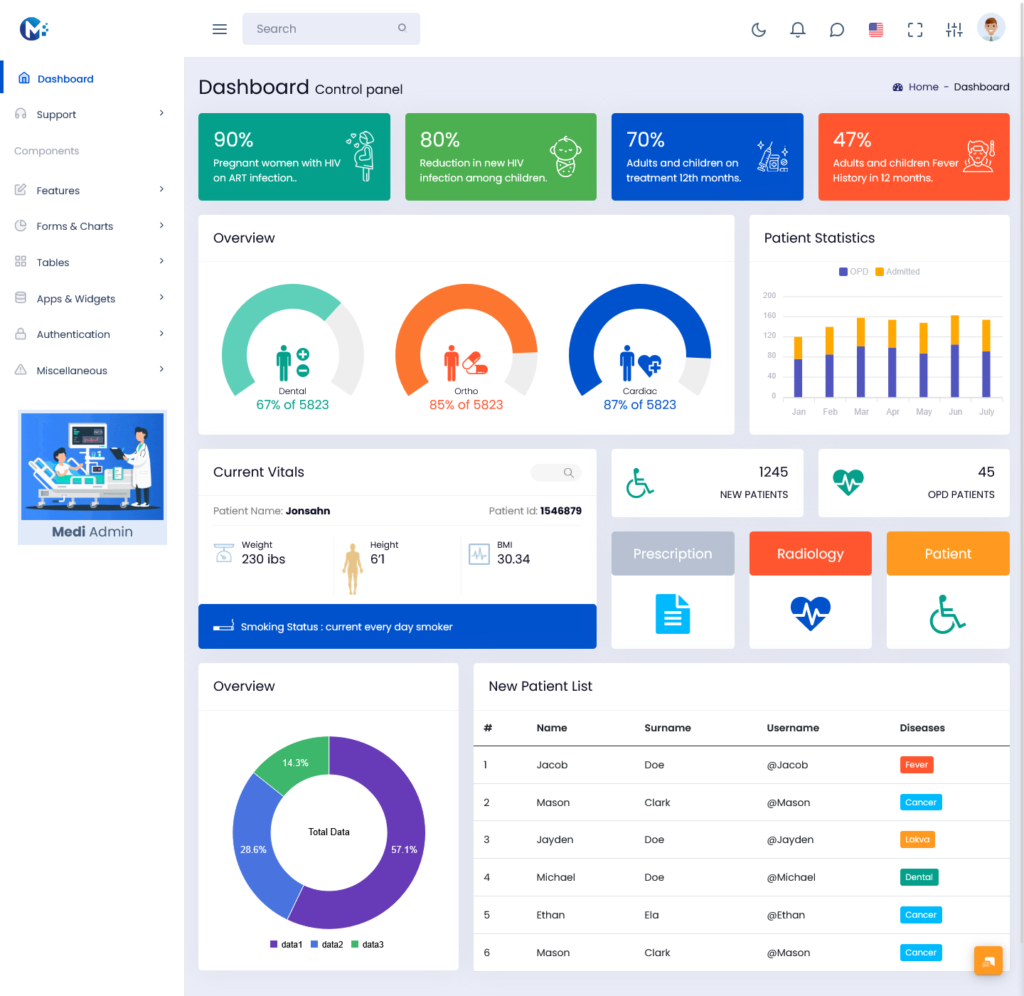
The control panel is the central section of this Dashboard Admin Template, giving a snapshot of key health indicators. It allows hospital staff to monitor vital data at a glance, helping teams make informed decisions quickly.
Key HIV and Treatment Indicators
This section highlights critical public health statistics:
- Percentage of pregnant women with HIV on ART
- Percentage reduction in new HIV infections among children
These metrics enable hospital administrators to evaluate the effectiveness of preventive programs, treatment coverage, and maternal health interventions. Presenting these figures clearly allows staff to track progress over time without digging through reports. By offering this level of clarity, the dashboard improves operational efficiency and ensures care programs are monitored consistently.
Long-Term Treatment and Fever History
In addition, the dashboard provides data on:
- Percentage of adults and children on treatment within 12 months
- Percentage of adults and children reporting fever history in the past 12 months
This helps healthcare teams identify risk areas, monitor treatment adherence, and ensure patients are receiving proper follow up care. By integrating these statistics into a single view, the template mirrors the organized approach found in top Admin Dashboards, allowing staff to focus on patient care instead of administrative tasks.
2. Departmental Activity Overview
Below the main indicators is a clear overview of three key departments: Dental, Ortho, and Cardiac. Each department shows activity levels as a percentage of a total value of 5823.
Department Performance Levels
The displayed performance values are:
- Dental Department: 67% of 5823
- Ortho Department: 85% of 5823
- Cardiac Department: 87% of 5823
These figures give administrators a quick understanding of departmental workload. Staff can anticipate busy periods, allocate resources efficiently, and ensure that patients receive timely care. By seeing all departments together in one place, medical teams can compare activity levels and identify areas requiring additional support. This section reflects the visual clarity and structured approach expected from a Premium Admin Dashboard, helping hospital leaders make strategic decisions confidently.
Explore Multiple Layouts & Version of Dashboard
Vertical Layout & Dark Version
BUY NOW DEMO
Mini Sidebar Layout & Light Version
BUY NOW DEMO
Mini Sidebar Layout & Dark Version
BUY NOW DEMO
Horizontal Layout & Light Version
BUY NOW DEMO
Horizontal Layout & Dark Version
BUY NOW DEMO
3. Monthly Patient Statistics
This section provides insights into patient trends through monthly data. Staff can compare OPD visits with inpatient admissions to understand hospital workload over time.
OPD and Admission Comparison
The dashboard allows teams to:
- Compare monthly OPD traffic
- Track inpatient admissions month by month
- Recognize seasonal increases or decreases in patient flow
- Plan resources, staffing, and inventory based on trends
The Bootstrap Admin Template ensures these charts are fully responsive, making them readable on desktops, tablets, and mobile devices. By providing visual trends, the dashboard reduces guesswork and allows managers to anticipate high demand periods effectively.
4. Patient Vitals and Basic Health Information
A dedicated section displays individual patient health information in a structured and accessible way. This helps doctors, nurses, and administrators review essential data quickly.
Essential Patient Data
The patient vitals section includes:
- Patient Name
- Patient ID
- Weight
- Height
- BMI
- Smoking Status
Having this information organized in a clear format saves valuable time for healthcare workers. It allows them to quickly assess patient conditions during consultations or follow-up rounds. The simplicity and accessibility of this Admin Template ensure no critical data is overlooked while maintaining workflow efficiency.
5. Quick-Access Side Panel
The side panel keeps frequently used tools within easy reach, improving navigation and minimizing time spent switching between modules.
Side Panel Sections
Included in the side panel:
- New Patients Record
- OPD Patients
- Prescription
- Radiology
- Patient
This layout allows doctors to move directly to prescriptions, administrators to check OPD lists, and radiology staff to access imaging records instantly. Efficient navigation like this is a hallmark of modern Admin Dashboards, streamlining operations and reducing administrative burden.
6. Overview of Key Data Segments
At the bottom of the dashboard, a rounded visual format summarizes important dataset groups. This section provides a clear view of how major categories are distributed.
Data Segmentation Summary
The segments include:
- Data 1
- Data 2
- Data 3
By displaying proportional data, hospital administrators can interpret performance, monitor category weight, and make informed operational decisions. The layout is clean, balanced, and mirrors the organized style of a Premium Admin Dashboard, offering both clarity and insight at a glance.
7. New Patient List
The new patient list section provides a structured view of recent patient entries, helping staff manage registrations, appointments, and departmental assignments.
List Structure
The table includes:
- First Name
- Surname
- Username
- Disease
This section ensures that staff can track newly registered patients efficiently. It also reduces errors and improves coordination between departments. The simple, clean design of this feature reflects the functionality expected in a professional Bootstrap Admin Template.
8. Why This Template Works for Healthcare Systems
The Medi Dashboard Admin Template is not just a generic layout, it is tailored for real-world clinical workflows.
Practical Tools for Medical Teams
The template supports:
- Hospital administration
- Appointment scheduling and management
- Patient tracking and monitoring
- Medical record review
- Departmental performance insights
Its responsiveness allows staff to access information on any device, desktop, laptop, tablet, or smartphone. Doctors, nurses, and administrators can work together seamlessly, improving overall patient care and operational efficiency.
Strong Development Foundation
Built with Bootstrap 5, this template is:
- Flexible and easy to customize
- Developer friendly for healthcare specific modifications
- Stable for long-term use in high volume settings
It can be used for hospital management systems, clinic CRMs, backend applications, or healthcare web portals. Its careful design ensures it ranks among effective Admin Dashboards, balancing clarity, usability, and practical features.
Conclusion
The Medi system delivers a highly functional and well organized Dashboard Admin Template suitable for modern hospitals and clinics. With clear analytics, structured patient data, department overviews, and responsive design, it enables healthcare teams to work efficiently and make informed decisions. Combining the reliability of a Bootstrap Admin Template, the clean visuals of a Premium Admin Dashboard, and the practical strength of professional Admin Dashboards, this solution helps hospitals streamline operations, reduce administrative tasks, and focus more on patient care.
Frequently Asked Questions (FAQs)
1. What is the Medi Dashboard Admin Template used for?
The Medi Dashboard Admin Template is designed to help hospitals and clinics manage their daily operations more smoothly. It brings together patient information, departmental activity, treatment records, and performance insights in one place, making it easier for staff to stay organized and work efficiently.
2. Is the template suitable for healthcare developers?
Yes, absolutely. Developers working on hospital systems, clinical dashboards, appointment platforms, CRMs, or any healthcare-related application can customize the template to match their project needs. Its structure is clean, stable, and easy to build on.
3. Does the template work well on mobile devices?
Yes, it’s fully responsive. Whether you open it on a desktop, tablet, or smartphone, the layout adjusts smoothly, making it convenient for doctors and staff who need quick access while moving between departments.
4. What kind of information can be tracked on the dashboard?
The dashboard covers several important areas, including patient vitals, monthly statistics, new patient entries, treatment indicators, and departmental performance. It’s built to give medical teams a complete picture of their operations.
5. Can the template handle patient statistics and analytics?
Yes. It includes clear visual sections that show trends such as OPD visits, admitted patients, and departmental activity levels. These insights help administrators plan resources and understand peak periods.
6. Is it easy for non-technical staff to use?
Yes, the layout is created with simplicity in mind. Even staff members who are not familiar with technical systems can understand the dashboard without difficulty. The clean sections and organized data help reduce confusion.
7. Does the template support patient record management?
It does. You can view new patient lists, check details like name, ID, height, weight, BMI, and smoking status, and move quickly between patient related sections. The template is structured to make patient management straightforward.
8. Can the template be customized for different healthcare departments?
Yes. Developers can customize the design, colors, modules, and layout to fit specific departments like dental, ortho, cardiac, radiology, or general medicine. The flexible design makes it suitable for various healthcare setups.
9. Is the template useful for hospitals with a large patient load?
Yes. It is built to handle high volumes of patient information and departmental data without feeling cluttered. It organizes information efficiently so staff can focus on patient care rather than digging through scattered details.
10. What makes this template different from regular admin templates?
This template is made specifically for healthcare environments. Instead of generic widgets and data blocks, it includes real healthcare-friendly sections like patient vitals, treatment indicators, department summaries, and organized patient lists. It’s built for practical, everyday use in medical facilities.