Ticket Management Dashboard for Modern Support System in 2026
A Ticket Management Dashboard is a powerful system used to organize and manage customer support requests in a structured way. It helps businesses handle support tickets efficiently and improves response time for customer queries. With a well-designed Support Ticket Dashboard, all incoming issues can be tracked from a single interface, making workflow easier and more transparent.
Modern Ticket Admin systems allow teams to manage communication between users and support agents smoothly. A Ticket Management Dashboard Template provides real-time insights into ticket status, performance, and workload. Using a Support Ticket Admin or Ticket Dashboard, companies can improve customer satisfaction, reduce delays, and maintain better control over support operations through centralized monitoring.
Ticket Management Dashboard for Support System Overview
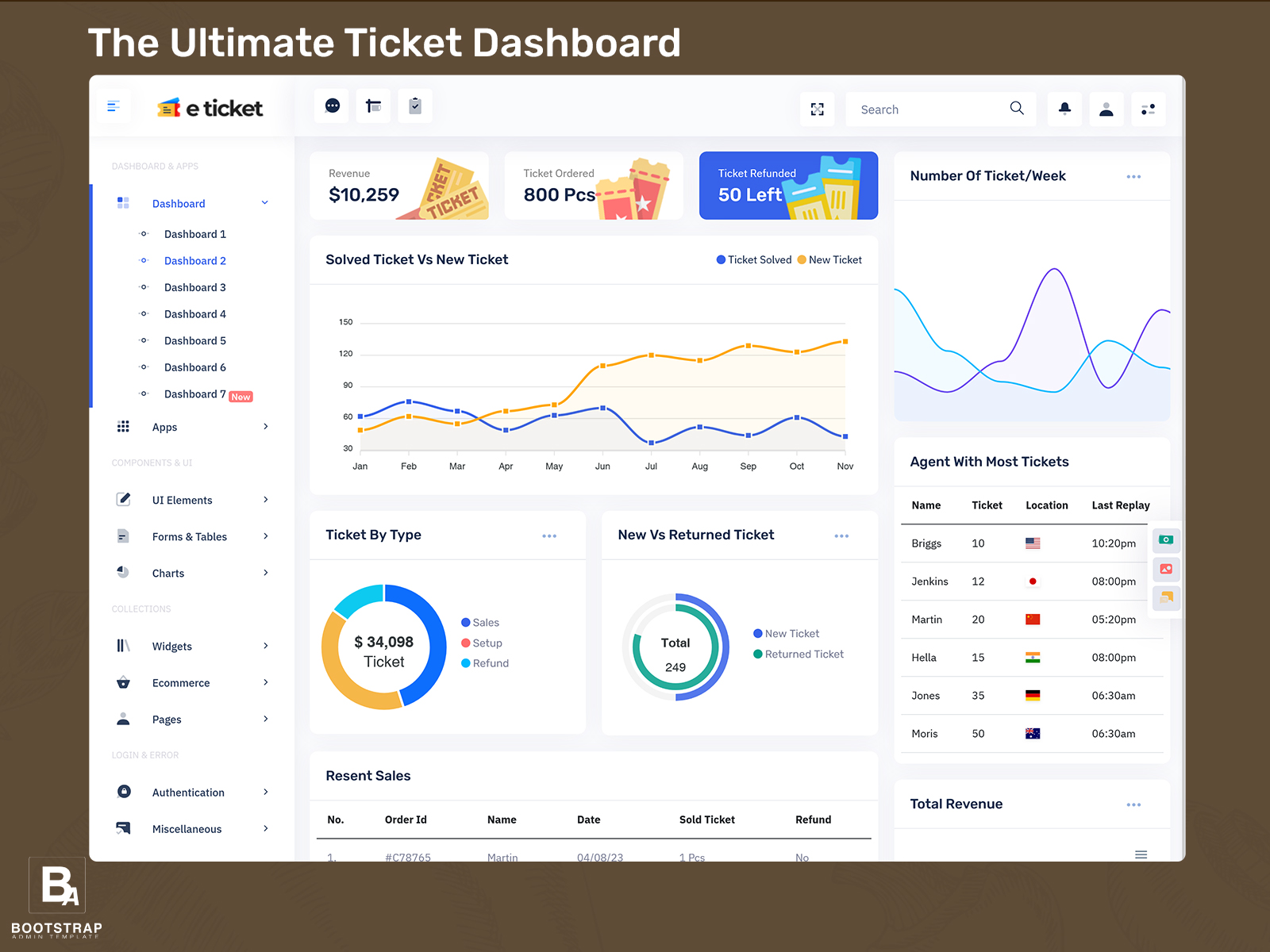
A Ticket Management Dashboard gives a complete overview of support activity by comparing resolved issues with new incoming tickets. The Solved Ticket Vs New Ticket module helps teams understand how efficiently problems are being handled and how quickly new requests are coming in.
The Number Of Ticket/Week module tracks weekly workload trends, helping managers analyze support demand over time. Ticket Ordered ensures that all support tickets are arranged based on priority and time of submission. A Support Ticket Dashboard using these modules helps improve visibility, streamline workflow, and ensure better handling of customer support requests in a structured system.
Support Ticket Dashboard for Real-Time Ticket Tracking System
A Support Ticket Dashboard helps manage and track customer issues in real time for faster resolution. The Ticket By Type module categorizes tickets based on issues like technical problems, billing queries, or general support requests, making it easier for teams to assign tasks correctly.
The New Vs Returned Ticket module highlights repeated or unresolved issues, helping teams identify recurring problems and improve service quality. Ticket Ordered ensures that urgent tickets are handled first based on priority. A Ticket Management Dashboard using these modules improves organization, reduces response time, and enhances overall customer support efficiency.
Features
1. Ticket Status Management System
A Ticket Management Dashboard includes real status tracking like Open, In Progress, Pending, and Closed. This helps support teams quickly understand ticket lifecycle and manage customer issues efficiently inside a Support Ticket Dashboard.
2. Ticket Assignment and Routing System
A Ticket Admin Panel allows automatic or manual assignment of tickets to support agents. It ensures every support ticket is directed to the right team member based on workload or category.
3. Priority-Based Ticket Handling System
A Support Ticket Dashboard includes priority levels like Low, Medium, High, and Urgent. This helps teams focus on critical issues first and improve response time in customer support operations.
4. Ticket History and Activity Log System
A Ticket Management Dashboard Template stores complete ticket history including comments, status changes, and updates. This gives full transparency for both admins and support agents.
5. Real-Time Dashboard Analytics System
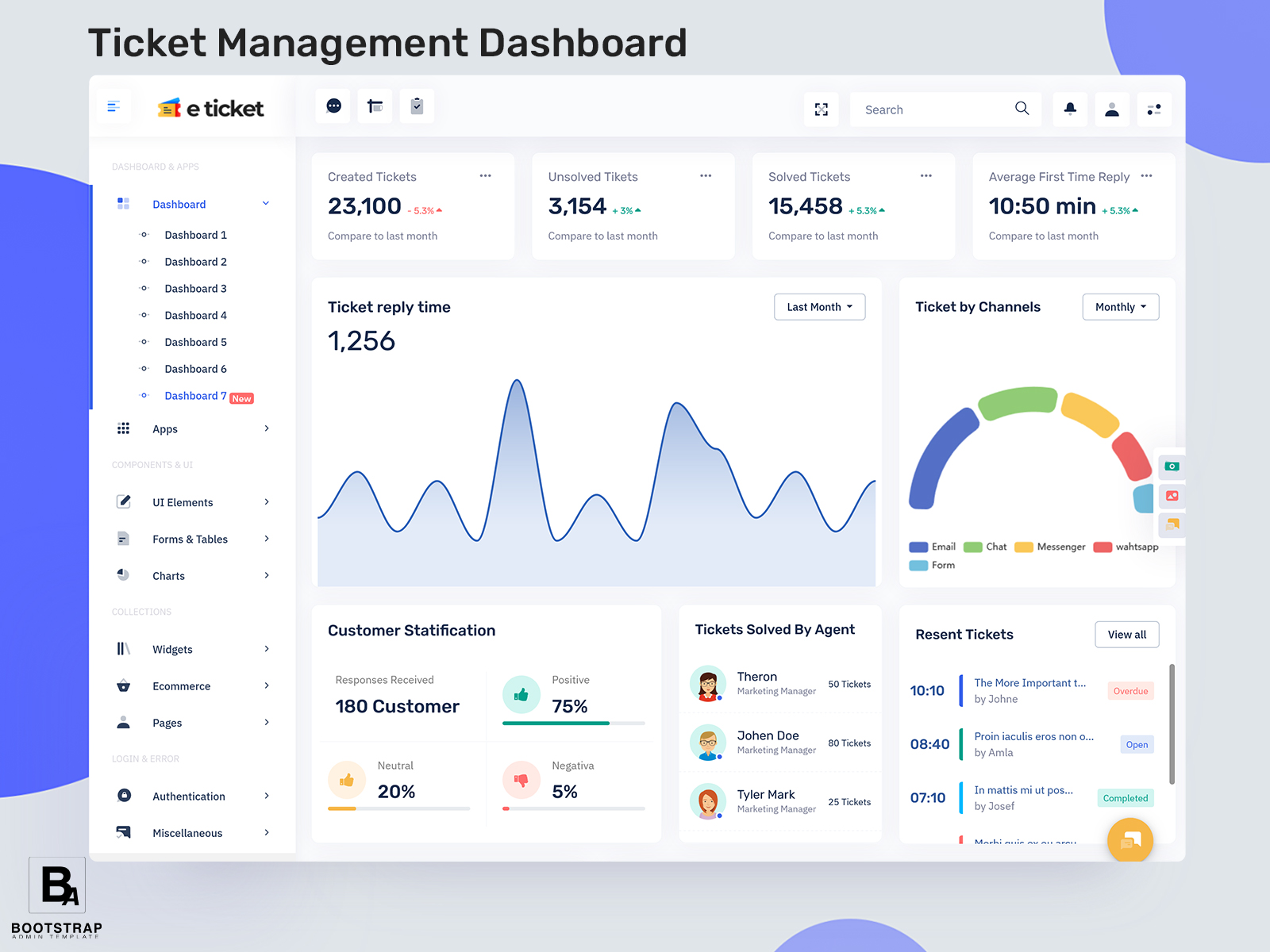
A Ticket Dashboard provides live analytics such as total tickets, open tickets, resolved tickets, and weekly ticket trends. This helps managers monitor performance and improve support efficiency.
Ticket Admin Panel for Customer Support Management System
A Ticket Admin Panel is used to manage all customer support operations from a centralized system. It allows administrators to assign tickets, track progress, and monitor resolution status effectively. The Ticket admin module ensures that all incoming requests are properly handled without confusion.
A Support Ticket Admin system improves coordination between support teams and customers by organizing communication clearly. With a Ticket Management Dashboard Template, businesses can quickly build structured support systems. This improves efficiency, reduces manual work, and helps maintain smooth customer service operations across the organization.
Ticket Performance Analytics Dashboard for Support Teams
Modules: Number Of Ticket/Week, Solved Ticket Vs New Ticket, Agent With Most Tickets
A Ticket Performance Analytics Dashboard helps measure how effectively support teams are working. The Number Of Ticket/Week module shows how many requests are received weekly, helping managers understand workload trends.
The Solved Ticket Vs New Ticket module compares resolved issues with new requests to measure efficiency. The Agent With Most Tickets module identifies which support agent is handling the highest number of tickets. A Support Ticket Dashboard with analytics helps improve performance tracking, balance workloads, and increase productivity in customer support systems.
Support Ticket Dashboard Template for Scalable Helpdesk System
A Support Ticket Dashboard Template provides a ready-made structure for building scalable helpdesk systems. It includes all essential components required for managing customer support efficiently, such as ticket tracking, reporting, and workflow management.
The Ticket Dashboard and Support Tickets modules help organize all customer queries in one place for easy access. A Ticket Management Dashboard Template allows developers to quickly deploy a functional support system. This improves efficiency, saves development time, and ensures smooth handling of customer service operations.
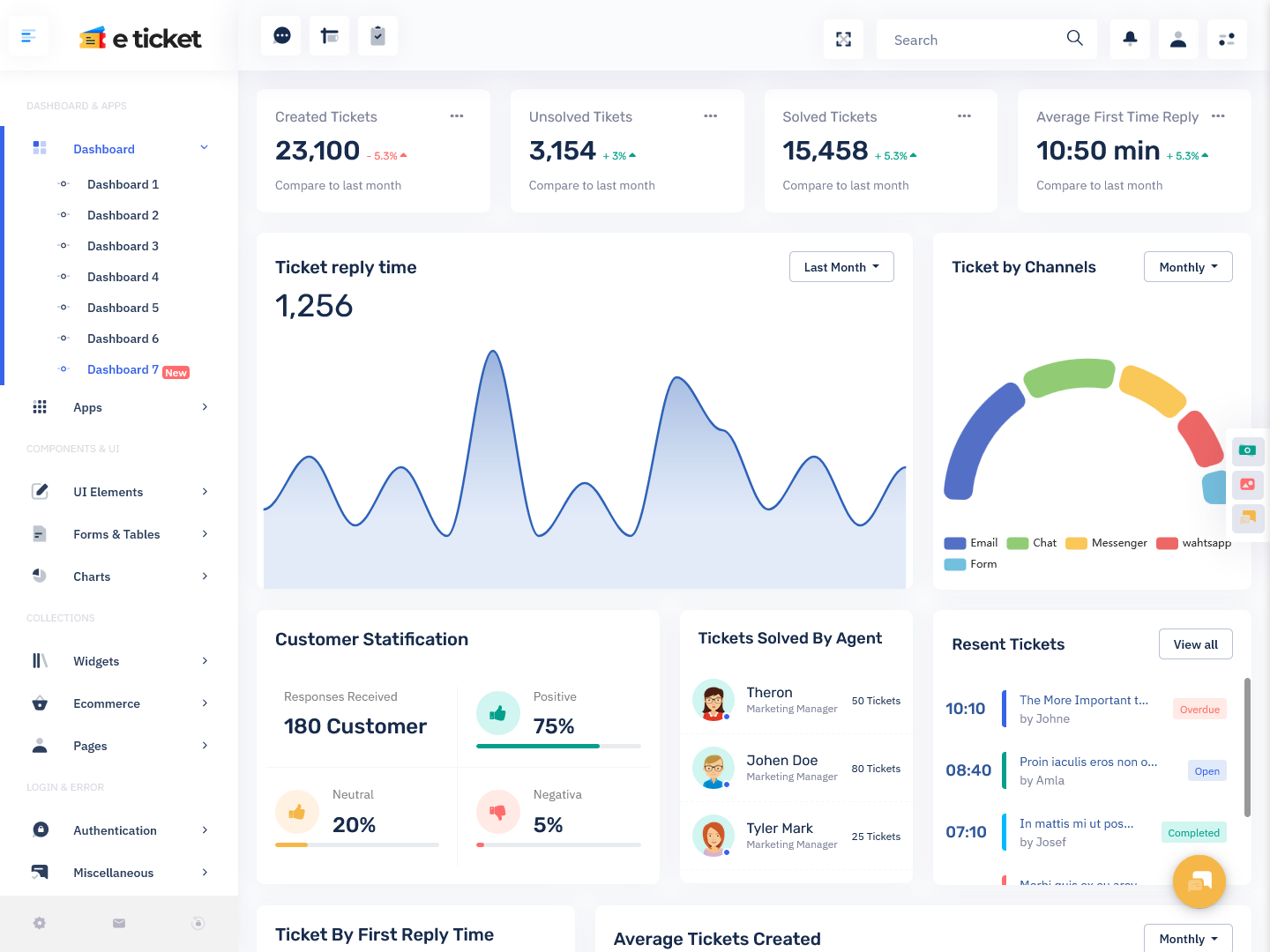
Ticket Assignment and Agent Performance Tracking Dashboard
A Ticket Assignment Dashboard helps distribute customer support tickets among agents based on workload and expertise. The Agent With Most Tickets module tracks individual performance and identifies workload distribution across the team.
Ticket Ordered helps prioritize urgent requests, while Ticket By Type categorizes issues for better assignment. A Support Ticket Dashboard improves coordination between team members and ensures faster resolution of customer problems by balancing workload effectively and maintaining structured support operations.
1. Faster Issue Resolution System
A Ticket Management Dashboard helps support teams respond quickly by organizing all support tickets in one place. With real-time updates in a Support Ticket Dashboard, agents can resolve customer issues without delays and improve overall service speed.
2. Better Workload Distribution System
A Ticket Admin Panel ensures tickets are evenly assigned among support agents. This prevents overload on a single team member and improves efficiency in handling multiple support tickets at the same time.
3. Improved Customer Satisfaction System
A Support Ticket Dashboard allows faster responses and proper tracking of customer issues. When tickets are resolved quickly and correctly, customer satisfaction naturally increases and builds trust in the support system.
4. Clear Performance Monitoring System
A Ticket Management Dashboard Template provides insights like total tickets, resolved tickets, and pending issues. Managers can easily track team performance and improve productivity using accurate data.
5. Organized Support Workflow System
A Ticket Dashboard keeps all support activities structured, from ticket creation to closure. This reduces confusion, improves communication between teams, and ensures smooth workflow in support operations.
Ticket Categorization System in Support Ticket Dashboard
A Ticket Categorization System organizes support requests based on issue type for better handling. The Ticket By Type module ensures that each ticket is assigned to the correct department or support category.
Support Tickets and New Vs Returned Ticket modules help identify repeated issues and unresolved cases. A Ticket Management Dashboard using categorization improves response accuracy, reduces confusion, and enhances the overall efficiency of customer support systems by ensuring proper ticket routing and resolution.
Weekly Ticket Monitoring System in Ticket Management Dashboard
A Weekly Ticket Monitoring System helps track customer support activity over time. The Number Of Ticket/Week module provides insights into weekly workload trends and support demand.
Solved Ticket Vs New Ticket helps evaluate team performance and response efficiency. A Support Ticket Dashboard ensures all ticket data is monitored in real time. This system helps managers plan resources effectively, improve workflow management, and maintain consistent customer support quality across all operations.
Conclusion
A modern Ticket Management Dashboard plays a vital role in streamlining customer support operations and improving response efficiency. It brings all support tickets, statuses, priorities, and agent activities into one centralized system. With a well-structured Support Ticket Dashboard, teams can easily track, manage, and resolve customer issues without confusion.
Using a Ticket Admin Panel and Ticket Management Dashboard Template, businesses can improve workflow organization and reduce response delays. Features like real-time tracking, ticket categorization, and performance analytics help enhance productivity. Overall, a Ticket Dashboard system ensures better communication, faster resolution, and a more organized support experience for both teams and customers.
FAQs
1. What is a Ticket Management Dashboard used for?
A Ticket Management Dashboard is used to track, manage, and resolve customer support tickets in one system. It helps teams improve response time and organize workflows. Many modern systems are built using Bootstrap Admin Template for responsive and scalable dashboard design.
2. What is a Support Ticket Dashboard?
A Support Ticket Dashboard is a tool that shows all customer support requests, their status, and progress in real time. It improves customer service efficiency. Most platforms use Bootstrap Admin Template to create structured support dashboard layouts.
3. What is a Ticket Admin Panel?
A Ticket Admin Panel allows administrators to assign, manage, and monitor support tickets. It ensures smooth workflow and better team coordination. Developers often use Bootstrap Admin Template to build flexible admin panels.
4. What features are included in a Ticket Management Dashboard?
It includes ticket status tracking, priority handling, agent assignment, analytics, and reporting tools. These features are commonly designed using Bootstrap Admin Template for modern UI structure.
5. What is the purpose of a Ticket Management Dashboard Template?
A Ticket Management Dashboard Template helps developers quickly build support systems with pre-designed layouts. It saves time and improves design quality using Bootstrap Admin Template.
6. How does a Support Ticket Dashboard improve customer service?
It improves customer service by providing real-time ticket updates, faster responses, and better issue tracking. Many dashboards use Bootstrap Admin Template for better performance and usability.
7. What is ticket priority in a Support Ticket Dashboard?
Ticket priority defines the urgency level of support requests such as low, medium, or high. It helps teams focus on critical issues first using systems built with Bootstrap Admin Template.
8. What is ticket assignment in a Ticket Admin Panel?
Ticket assignment is the process of allocating support tickets to specific agents based on workload or expertise. This is managed efficiently using Bootstrap Admin Template dashboards.
9. Why do companies use Ticket Dashboard systems?
Companies use Ticket Dashboard systems to organize support requests, improve response time, and increase customer satisfaction. These systems are often built using Bootstrap Admin Template.
10. Is a Ticket Management Dashboard useful for small businesses?
Yes, it helps small businesses manage customer queries efficiently and improve support quality. Bootstrap Admin Template makes it easy to build scalable dashboard solutions.